Cultivate your files.

A fast file manager for every desktop.

Built from scratch as a native app for macOS, Windows, and Linux—with customizable visual styles, smooth 120 fps scrolling, flexible multi-pane tabs, 50-step Undo, and zero telemetry.

v0.4.2-alpha.2 Free during early access Offline-first · Zero telemetry macOS, Windows & Linux

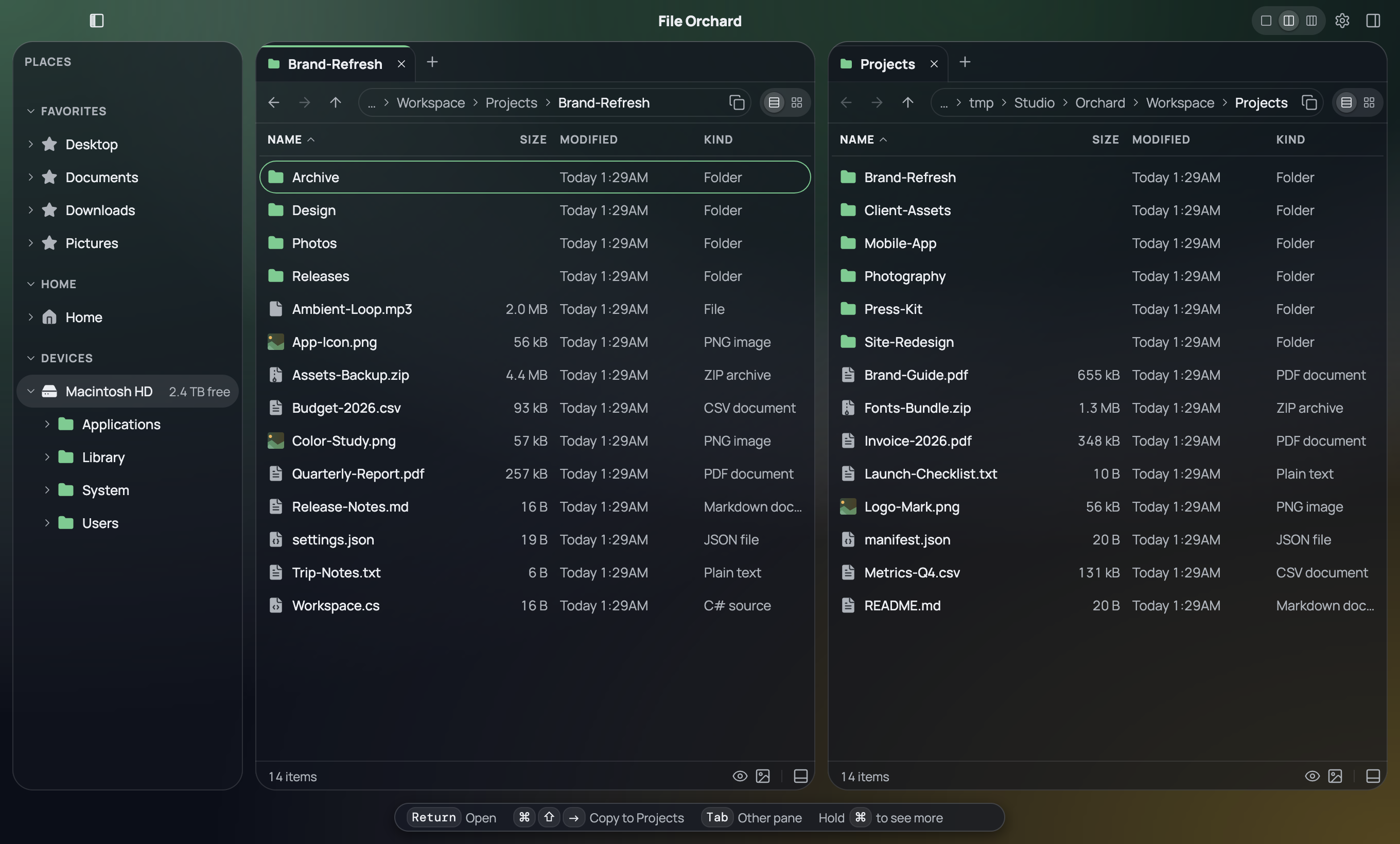
File Orchard in Aurora style showing Places sidebar, two file panes with solid icons, and floating Hint Bar.

Aurora: soft radial corner glows, translucent glass panels, solid icons, and floating Hint Bar.

Cross-platform by design

Take your file manager with you wherever you go

The fastest modern file managers lock you to Windows or macOS. Cross-platform alternatives trade speed for heavy browser-engine weight, or trap you in a cluttered 1990s grid. File Orchard brings the same fast workflow and muscle memory to macOS, Windows, and Linux—while respecting each OS's shortcuts, trash, and conventions.

macOS

Apple Silicon

Real multi-pane tabs, standard ⌘X Cut & Paste, an editable address bar, instant Info panel, and native file watching—everything Finder makes awkward.

  • Primary modifier⌘ Command
  • Default lookAurora (switch anytime)
  • DistributionSigned .dmg & Homebrew Tap
Windows

Windows 10 & 11

A standalone native app that leaves Windows 11 File Explorer's lag, sluggish context menus, and thumbnail stalls behind—with no Electron bloat or background preloader.

  • Primary modifierCtrl
  • Default lookFluent (switch anytime)
  • DistributionInstaller (.exe) & portable .zip

Linux

Wayland & X11

One fast visual file manager across GNOME, KDE, and tiling window managers—no heavy desktop-environment dependency chains and no freezes on large photo folders.

  • FavoritesImports GTK & KDE bookmarks
  • Default lookFrosted (switch anytime)
  • Distribution.deb, .rpm, Arch & .tar.gz

Measured speed

Built to feel instant, even in massive folders.

Slow file managers interrupt your train of thought—lagging on launch, stalling on big camera rolls, or freezing while copying files. File Orchard is compiled to native code and measured continuously so everyday browsing stays effortlessly smooth.

120 fps Smooth scrolling at 100,000 files Holds full 120 Hz fluidity on high-refresh displays with zero dropped frames—even during a 16 GB copy.
< 0.4 s Ready to browse from launch Opens ready for input in roughly a third of a second—no silent background preloader or multi-second startup wait.
Instant Cached photo thumbnails Thumbnails load in ~3 ms from a fast local cache, so large photo folders and HEIC camera rolls never stall.
~0% Quiet in the background Uses under 0.03% CPU while keeping massive folders live-updated—no polling, no spinning fans, no battery drain.

True native app, no browser bloat

Compiled ahead of time to native machine code—avoiding the sluggish launches and runaway memory spikes that hit Electron and web-wrapped apps when you open multiple panes.

Purpose-built for huge directories

Custom file lists and thumbnail grids draw only what's on screen and reuse visuals cleanly, so jumping between folders, selecting files, and holding modifier keys respond the moment you press.

Always live, never in your way

Open tabs and the sidebar share native OS file watching, keeping folders up to date automatically without redundant scans or freezes while heavy transfers run.

Verified on Apple Silicon (120 Hz, 2× Retina) against real 10,000- and 100,000-file folders, plus pure software-rendered scrolling for GPU-free desktops.

Built on trust

Your files stay on your machine. Full stop.

A file manager touches everything private on your disk. File Orchard is designed around restraint: no accounts, no tracking telemetry, no forced AI popups, and no rental lock-in.

Zero telemetry

No analytics SDKs, no unique device IDs, and no automatic crash uploads. Optional update checks fetch one plain static file.

100% offline-first

Settings live in plain JSON on your machine and thumbnails stay strictly local. No sign-in required.

No bolted-on cloud AI

No chatbots, upsell banners, or web search results wedged into your local folders—just crisp file navigation.

Fair licensing at 1.0

Free throughout alpha and beta. At 1.0, buy once and keep your version forever across macOS, Windows, and Linux.

Current progress

What's built today in 0.4.2-alpha.2.

File Orchard is in active early development. Here is what's already built and working today across macOS, Windows, and Linux.

Built & working today

v0.4.2-alpha.2
  • Three visual styles & five paired palettes: Aurora, Frosted, and Fluent with Light & Dark modes, independent zoom & density, and live switching.
  • Flexible 1–4 panes & tabs: Open panes side by side, drag tabs into gaps to split, and remember Details or Icons view per folder.
  • 120 fps lists & fast photo thumbnails: Smooth scrolling in 100,000-file folders, local thumbnail caching with HEIC support, and a docked Info panel.
  • 50-step Undo, Batch Rename & ZIP: Reversible file operations with clear Conflict Dialogs, live Batch Rename preview, and ZIP compress/extract.
  • Live Hint Bar & automated releases: Discoverable keyboard shortcuts, native macOS/Windows/Linux builds, and quiet update checks in Settings → About.

What's ahead

Public roadmap soon

Right now we're focused on polishing the core experience, expanding package-manager support across macOS, Windows, and Linux, and shipping early pre-release builds you can test on real machines.

A full public roadmap is being put together so upcoming milestones stay realistic and well-scoped. In the meantime, every tagged release publishes release notes and checksums directly on our public Releases page.

Everyday workflow

Simple at a glance. Ready when you reach for it.

Organize across panes, discover shortcuts as you go, and undo mistakes—without digging through cluttered menus.

01 · Multi-pane layout

One pane to browse. Up to four when you're moving files.

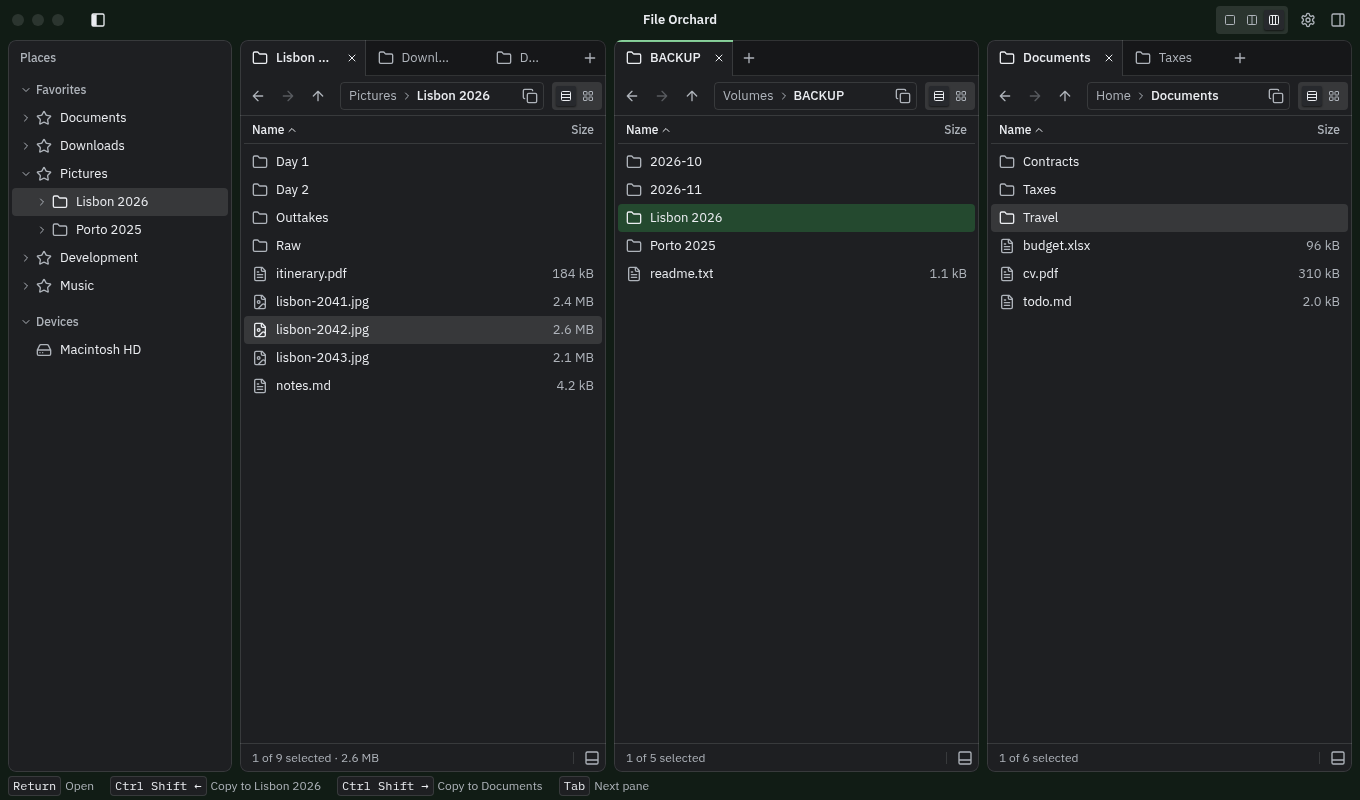
Start in a single window, then open up to four panes side by side whenever you're comparing folders or sorting files. Drag any tab between strips—or drop it into a gap to split on the spot.

  • Folding panes keep your tabs intact—collapse back to one pane and re-expand right where you left off.
  • Copy or move files straight to the neighboring pane with a single shortcut or drag them across.
File Orchard showing three side-by-side panes with tabs and independent breadcrumb paths.

02 · Discoverable shortcuts

Useful keyboard shortcuts you learn as you go.

Move faster without memorizing a cheat sheet. File Orchard includes practical shortcuts for everyday file work, and the bottom Hint Bar teaches them naturally: hold a modifier key and it narrows live to show what's right under your fingers.

  • Context-aware hints surface copy-to-pane, rename, undo, and view shortcuts right when they apply.
  • Try toggling the modifier keys in the live preview to see how the Hint Bar adapts as you hold keys.
Interactive Hint Bar preview
Toggle modifiers:
report-final.pdf · 245 kB

03 · Safe operations & 50-step Undo

Built-in Undo and clear previews for every file change.

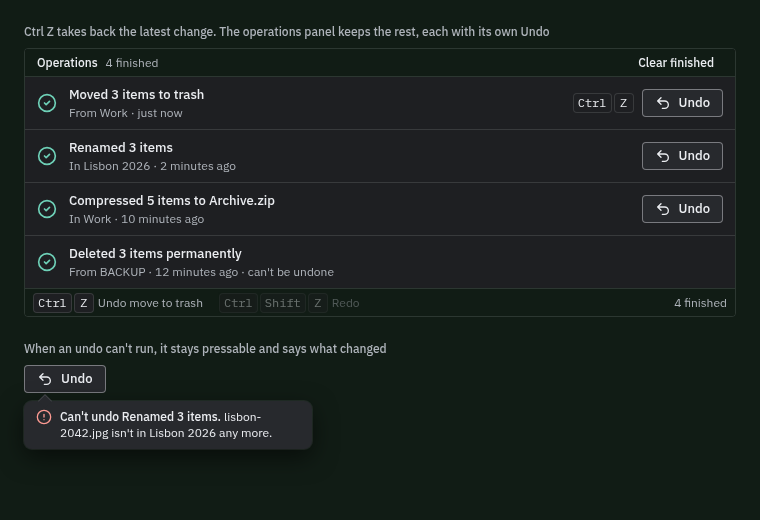
File Orchard remembers your last 50 moves, renames, Trash actions, copies, and ZIP archives—verifying files before reversing so nothing is overwritten if something changed on disk.

  • Press Ctrl Z or click Undo on any finished item right inside the Operations panel.
  • Batch Rename previews every new name live, catches collisions upfront, and reverses in one Undo.
File Orchard Operations panel showing finished file operations with per-row Undo buttons and a clear note explaining when an item moved.

04 · Photos & file details

Fast thumbnails and a docked Info panel when you need them.

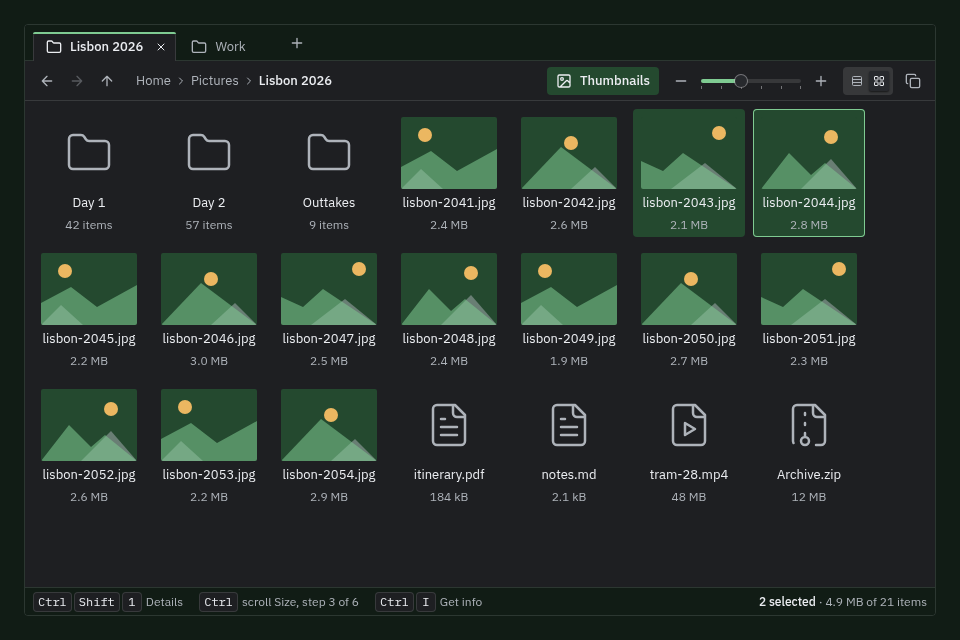
Browse large camera rolls and asset folders without stalls. Thumbnails cache locally (including HEIC), keep original aspect ratios, and sit on a neutral pane so photo colors stay accurate.

  • Remembers Details or Icons view across 500 folders and steps smoothly through six thumbnail sizes.
  • Live Info panel docks at the side or beneath a pane with dimensions, permissions, and one-click path copy.
File Orchard Icons view showing crisp photo thumbnails, folders, size slider, and Details/Icons view switcher.

Styles & customization

Three distinct styles. Five color palettes. Live switching.

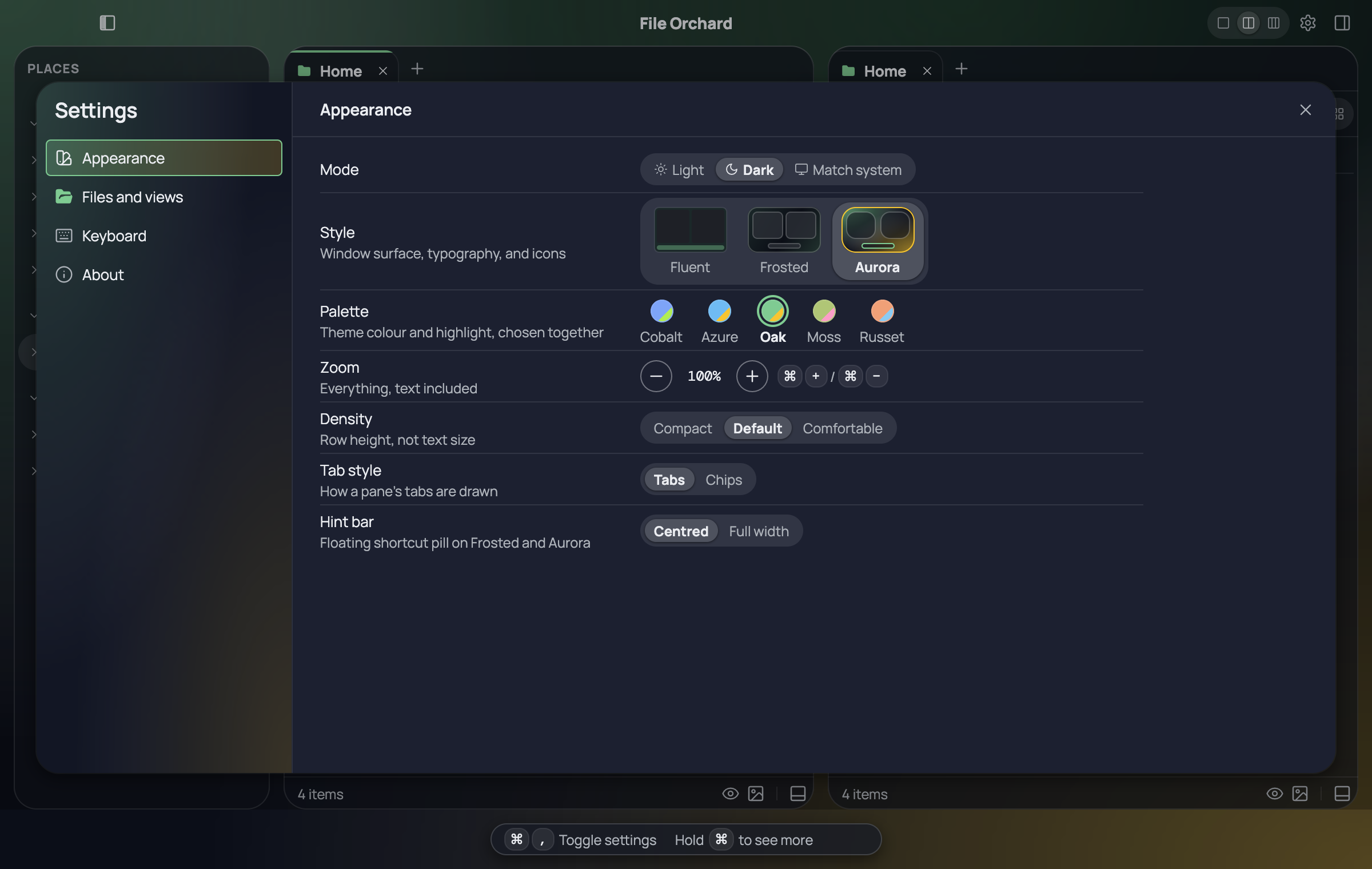
Make File Orchard look the way you like to work. Choose between three visual styles—each with its own window surfaces, corner geometry, typography, icons, and Hint Bar framing—then pair it with your favorite palette, color mode, zoom, and density. Click any option below to preview it live on this page.

Curated palettes & layout controls

Five paired palettes, plus independent zoom and density.

Each palette pairs a subtle window color with a matching high-contrast keyboard highlight—tuned for legibility in both light and dark modes. Zoom scales everything cleanly from 80% to 200%, while Density adjusts row spacing independently.

Mode
Style
Palette (theme color + keyboard highlight, tuned together)
File Orchard Appearance settings showing Light/Dark/Match system modes, Fluent/Frosted/Aurora visual styles, five paired palettes, independent Zoom and Density, Tab style, and Hint bar options.

Download File Orchard

Get File Orchard 0.4.2-alpha.2.

Standalone native builds for macOS, Windows, and Linux. Free during early access—no account, no card, no telemetry.

Pre-release builds publish on our GitLab Releases page.

Signed & notarized macOS builds, Windows installer & portable zip, Linux packages, and SHA256SUMS.txt checksums appear here automatically as each release publishes.

Open Releases Page

macOS

macOS 14 Sonoma or later · Signed & notarized Apple Silicon

macOS Apple Silicon .dmg · arm64
Releases page

Windows

Windows 10 or 11 (64-bit) · Standalone installer or portable zip

Windows x64 (Installer) .exe · x64
Releases page
Windows x64 (Portable) .zip · x64
Releases page

Linux

x86_64 & ARM64 · Native Wayland & X11 · DEB, RPM, Arch, and tarball

Debian / Ubuntu (x64) .deb · x64
Releases page
Fedora / RHEL (x64) .rpm · x64
Releases page
Arch / CachyOS (x64) .pkg.tar.zst · x64
Releases page
Linux x64 (Tarball) .tar.gz · x64
Releases page

Install from the terminal

Official Homebrew Tap (alpha track) — updates automatically with each release.

brew tap fileorchard/tap https://gitlab.com/fileorchard/homebrew-tap.git && brew install --cask fileorchard/tap/file-orchard@alpha

Free during early access · Fair license at 1.0

File Orchard is free and unrestricted throughout alpha and beta—no account, no card, and no feature gates.

At 1.0, File Orchard plans a simple one-time personal license across all your macOS, Windows, and Linux machines—keep the version you bought forever, with no subscription lock-in.